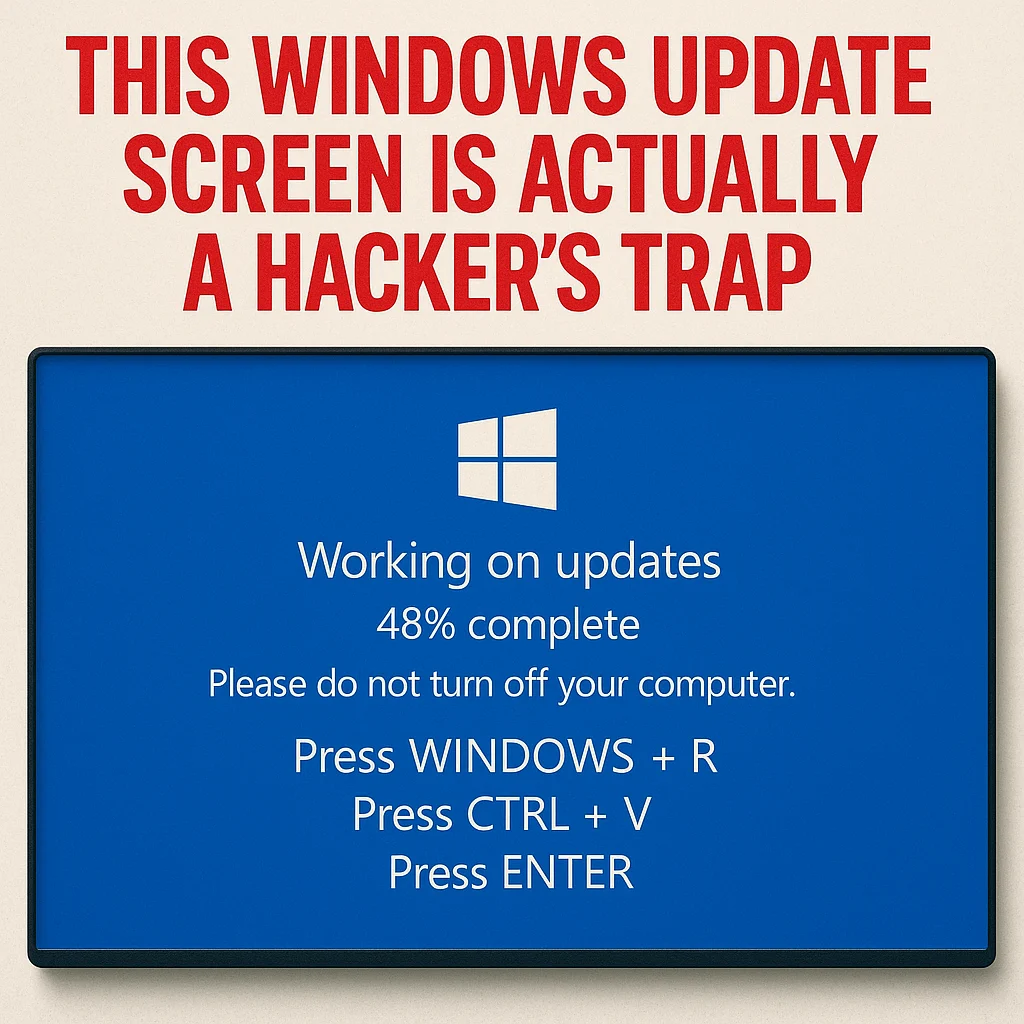
Imagine sitting at your desk, and suddenly your browser turns blue.
The familiar “Updating Windows… Do not turn off your computer” message appears.
You sigh, grab some coffee, and wait. But this time, something feels off—it’s asking *you* to press keys to “finish the update.”
If that ever happens: stop immediately.
Cybersecurity experts have uncovered a new browser-based scam that mimics the Windows Update screen to trick users into installing malware. The scheme, part of a growing “ClickFix” campaign, has been spotted on fake domains like *groupewadesecurity[.]com*, where hackers use the browser’s fullscreen mode to completely disguise the attack.
What’s Actually Happening
This isn’t Microsoft updating your system—it’s a hacker’s illusion.
The fake screen asks you to:
- Press Windows + R (to open the Run command).
- Press CTRL + V (to paste).
- Then hit Enter.
Those steps sound harmless… but here’s the trick:
When you press CTRL + V, you’re pasting a malicious command that the attacker secretly copied to your clipboard.
Hit enter—and you just gave the hacker control of your computer.
Why It Works
The attack takes advantage of something all business owners rely on: trust and routine.
Windows updates are normal. A blue screen doesn’t raise suspicion.
But this “ClickFix” method has evolved from old scams that looked like browser errors or CAPTCHA tests. Now, the fake update screen is so realistic that even IT-savvy employees have been fooled.
Once the code runs, it can install:
- Keyloggers (to capture passwords)
- Ransomware (to lock your files)
- Remote access tools (giving hackers control of your systems)
- Crypto miners (that slow down your computers)
And since the victim triggers it manually, most antivirus programs don’t block it—because technically, *you* ran the command.
What You Should Do
Here’s the good news: spotting this scam is easy if you know what to look for.
✅ If a Windows update appears inside your browser—it’s fake. Real Windows updates only appear on your desktop, not through Chrome or Edge.
✅ Never run keyboard commands unless you know why.
No legitimate IT department or vendor will ever ask you to press keys like Windows + R from a website.
✅ Close the tab immediately.
Press ESC or shut down the browser if you see a “full-screen update” page.
✅ Train your team.
Even one employee falling for this trick could infect the entire company network.
The Bigger Picture
This new wave of ClickFix attacks is spreading fast.
Cybersecurity company ESET reports that these campaigns now deliver everything from ransomware to remote-control malware—and they’re bypassing traditional antivirus software.
For small and mid-sized businesses, that’s especially dangerous. Why?
Because smaller companies often don’t have full-time cybersecurity staff. One click on a “fake update” could bring down your entire system.
If you'd rather have someone handle this for you, talk to us.

No comments yet