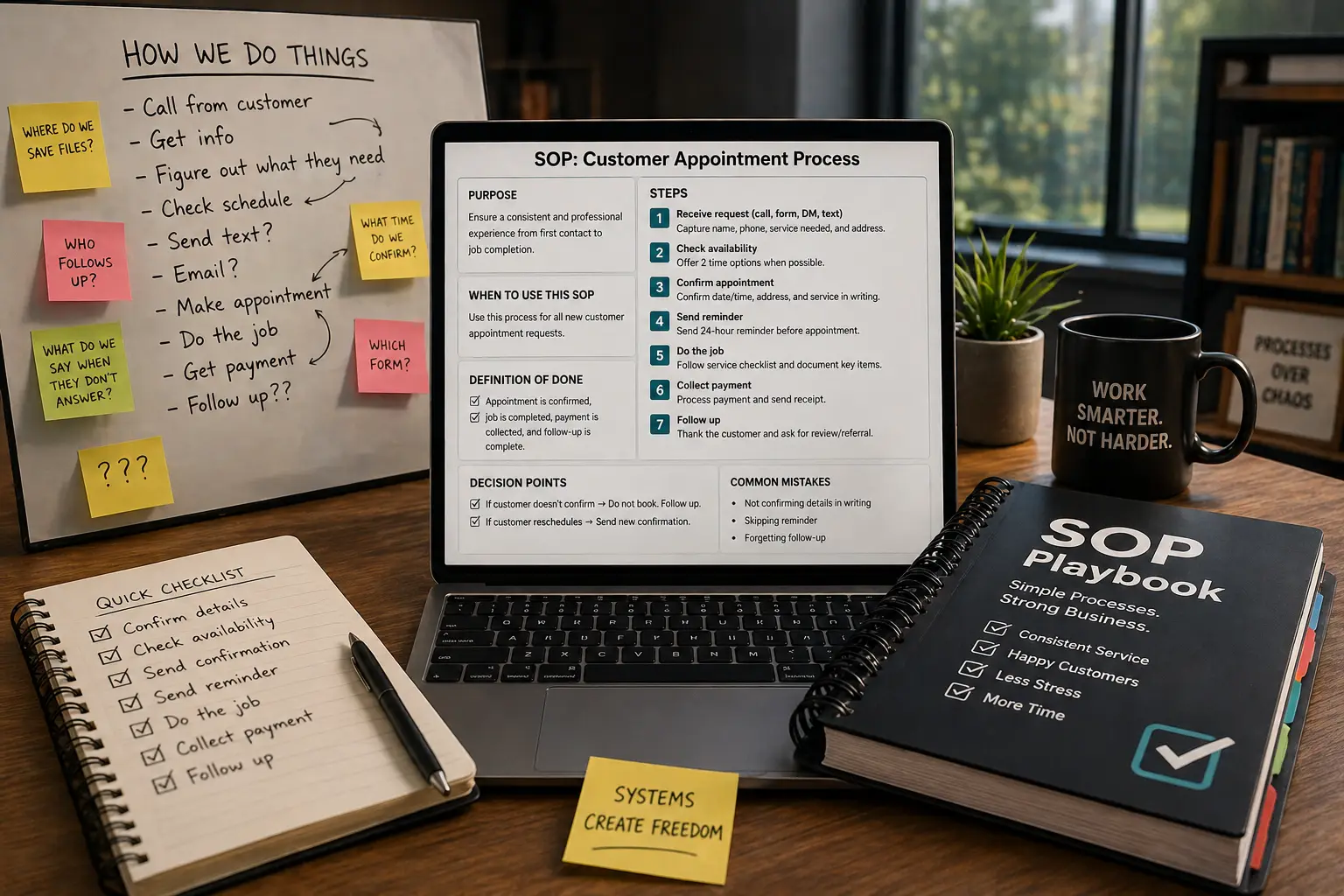
"Just ask me if you're not sure."
It feels helpful. It keeps things moving. It also means the business runs on your memory, and the day you're sick, on a job site or on vacation, your team starts guessing. Guessing turns into rework, refunds and the occasional bad review.
AI is genuinely good at one part of fixing this: turning a messy "here's how we do it" into a short, clean procedure. The rest is choosing the right process, testing it with a real person, and putting it where people will see it.
The quick answer
- Pick the one process that causes the most repeat questions or mistakes. Just one.
- Talk it through for two to five minutes as if you're training a new hire, and get it into text.
- Paste the text into an AI tool with the SOP prompt below. Then ask it to cut the result down.
- Hand it to one person and watch them use it. Fix what tripped them up.
- Put it where the work happens: the shared folder, a pinned Teams or Slack post, a printed checklist at the counter.
Which SOP to write first
An SOP (standard operating procedure) is just the agreed way to do a task. Start where the chaos costs you most. Common first picks:
- Lead intake: what happens when a call, form or message comes in.
- Quoting: what information you collect, how you price, how you send it.
- Scheduling: confirmations, reminders, reschedules.
- Job start and closeout: what to bring, what to check, photos, notes, payment.
- Invoices and past-due accounts: when to remind, when to escalate.
- Customer complaints: first response and the options staff can offer.
- Tool access: who can install browser extensions, connect apps or approve permissions.
Not sure which? For one week, every time someone asks you "how do I...?", write the question down. The one that shows up most is your first SOP.
What makes an SOP one people follow
Most SOPs fail because they're too long, too vague, too formal, or written for an imaginary perfect day.
The ones that get used are:
- One page or less.
- Numbered steps, each starting with a verb.
- If/then decisions for the common forks ("If the customer doesn't confirm, don't book").
- A clear "done" so people know when to stop.
- A checklist version for use mid-task.
Think checklist, not handbook.
Building it with AI, step by step
Step 1: Record the process once
Open a voice memo on your phone or start a recorded call with yourself, and explain the task like you're training someone on day one. Cover:
- What starts this process?
- What are the steps, in order?
- What decisions come up along the way?
- What do people usually get wrong?
- What does "done" look like?
Two to five minutes is plenty. Then get it into text: type it up, or use the transcription built into your phone or meeting app if it has one.
Step 2: Ask AI for a first draft
Paste your notes into the AI tool your business uses, with this prompt:
Turn the notes below into a short SOP a new employee can follow. Format: Purpose (1 sentence). When to use this SOP. Steps (numbered, 6-12 max). Decision points (If/Then). Common mistakes to avoid. Definition of done. Keep it under one page and use plain language.
Use the version tied to your work account, not a personal login, and leave out customer names, account numbers and passwords. Our post on which AI tools employees can use covers which business versions keep your data out of model training.
Step 3: Make it shorter
The first draft is almost always too wordy. Follow up with:
Rewrite this SOP so someone can skim it in under 60 seconds. Short steps, key actions in bold, decision points as bullets. Remove anything that isn't an instruction.
Step 4: Add the real-world cases
SOPs earn trust when they cover the awkward situations your team actually hits:
Add 3 common scenarios with the correct action, each under 3 lines. For example: customer reschedules, information is missing, urgent request.
Swap the examples for the ones you see most.
Step 5: Make a checklist version
Nobody reads a full SOP halfway through a job. Ask:
Create a one-page checklist version of this SOP that someone can follow without reading the full document.
Now you have two pieces: the SOP for training, and the checklist for doing.
Step 6: Check it, then test it with a person
Read every step yourself before anyone else sees it. AI fills gaps with plausible guesses: a step you never do, a policy you don't have, a timeframe you made up on the spot. Our post on AI mistakes in business documents explains why that happens.
Then hand it to someone who doesn't usually do the task and ask:
- Can you follow this without asking me anything?
- Which step was unclear?
- What's missing?
Update it once. Done.
Two examples to copy
Scheduling SOP
Starts when: a customer asks for an appointment.
Steps:
- Confirm the service needed and the address.
- Offer two time windows.
- Confirm date, time, address and service in writing.
- Send a reminder 24 hours before.
If/then:
- If the customer doesn't confirm, don't book.
- If they reschedule, send a new written confirmation.
Done when: the appointment is confirmed and on the team calendar.
Quote SOP
Starts when: a lead asks for a quote.
Steps:
- Collect what you need: photos, address, timeline.
- Build the quote from the pricing sheet.
- Send it with the scope and what's not included.
- Set a follow-up task for 24 to 48 hours later.
Done when: the quote is sent and the follow-up task exists.
Why SOPs stop getting used
- Nobody can find them. If it's buried three folders deep, it doesn't exist.
- They went out of date. One wrong step and people stop trusting the whole document.
- They were written for the boss, not the person doing the work.
- Nobody owns them.
Keeping SOPs alive
- Store them in one place everyone already opens: a shared folder in OneDrive, SharePoint or Google Drive, or a pinned post in Teams or Slack. Print the checklist for tasks done away from a screen.
- Name them the same way: "SOP - Scheduling", "SOP - Quotes". Easy to search.
- Give each one an owner and a "last checked" date at the top.
- Review them twice a year, and whenever a tool or price changes.
- One staff rule: "If the SOP is wrong, tell the owner the same day."
When to get help
- The process involves several systems (CRM, accounting, scheduling) and the SOP keeps breaking where they meet.
- You want staff to have access only to the SOPs and folders they need.
- You're not sure your AI tool is safe for business information.
If you'd like help setting that up, get in touch.




No comments yet